Back to Top

Download and Install Autodesk AutoCAD 2016-2020

Autodesk AutoCAD 2016-2020 
Are you an Engineer or a Designer, and looking to Download AutoCAD Software.

So here I am with the most used worldwide Drafting and Designing software Autodesk AutoCAD. With the help of this Page,

You can Download AutoCAD 2016 to 2020 Version For Windows and IOS.

System Requirements for AutoCAD 2016

Operating System: Microsoft® Windows 10 | 8/8.1 | 7
CPU Type: Minimum Intel® Pentium® 4 or AMD Athlon™ 64 processor
Memory: 4 GB (8 GB recommended)
Display Resolution: 1024×768 (1600×1050 or higher recommended)
Display Card: Windows display adapter capable of 1024×768
Disk Space: Installation 6.0 GB
NET Framework: .NET Framework Version 4.5


System Requirements for AutoCAD 2017

Operating System:  Microsoft® Windows® 10| 8.1 | Windows 7 SP1
CPU Type 1 gigahertz (GHz) or faster 32-bit (x86) or 64-bit (x64) processor
Memory For 32-bit AutoCAD 2017:2 GB (3 GB recommended)
For 64-bit AutoCAD 2017:4 GB (8 GB recommended)
Display Resolution 1360×768 (1600×1050 or higher recommended) with True Color.
125% Desktop Scaling (120 DPI) or less recommended.
Display Card Windows display adapter capable of 1360×768 with True Color capabilities and DirectX® 9 ¹. DirectX 11 compliant card
Disk Space Installation 6.0 GB
.NET Framework .NET Framework Version 4.6


Download AutoCAD 2018

Operating System
Windows® 7
Windows 8.1
Windows 10 (64-bit only)
CPU Type
32-bit: 1 gigahertz (GHz) or faster 32-bit (x86) processor
64-bit: 1 gigahertz (GHz) or faster 64-bit (x64) processor
Memory
32-bit: 2 GB (4 GB recommended)
64-bit: 4 GB (8 GB recommended)
Display Resolution
Conventional Displays:
1360 x 768 (1920 x 1080 recommended) with True Color
High Resolution & 4K Displays:
Resolutions up to 3840 x 2160 supported on Windows 10, 64 bit systems
Display Card
Windows display adapter capable of 1360 x 768 with True Color capabilities and DirectX® 9 ¹. DirectX 11 compliant card recommended.
Disk Space
Installation 4.0 GB
.NET Framework
.NET Framework Version 4.6


EaseUS Data Recovery Wizard Free


recover data due to format, lost partition, system crash, virus attack. It can restore files from formatted disk, dynamic disk, deleted or lost partition with original file names and storage paths. It is designed with wizard mode which makes the data recovery process easy even for a beginner. It supports data recovery from the hard disk and other media, such as Memory card, USB flash drive, or SD card under Windows 2000, XP, 2003, Vista, 2008, Windows 7, Windows 8 and Win 10.


EaseUS Partition Master

EaseUS Partition Master  professional partitioning toolkit delivers the best disk management on Windows PCs/servers and offers a data storage service. Designed for organizations, enterprises, IT admins, technicians, consultants, and service providers. Data builds up fast. Keeping this data intact and well-organized presents a challenge for enterprises. Excellent storage management is crucial for any business


Activate Office 365 ProPlus

@echo off
title Activate Office 365 ProPlus for FREE - MSGuides.com&cls&echo ============================================================================&echo #Project: Activating Microsoft software products for FREE without software&echo ============================================================================&echo.&echo #Supported products: Office 365 ProPlus (x86-x64)&echo.&echo.&(if exist "%ProgramFiles%\Microsoft Office\Office16\ospp.vbs" cd /d "%ProgramFiles%\Microsoft Office\Office16")&(if exist "%ProgramFiles(x86)%\Microsoft Office\Office16\ospp.vbs" cd /d "%ProgramFiles(x86)%\Microsoft Office\Office16")&(for /f %%x in ('dir /b ..\root\Licenses16\proplusvl_kms*.xrm-ms') do cscript ospp.vbs /inslic:"..\root\Licenses16\%%x" >nul)&(for /f %%x in ('dir /b ..\root\Licenses16\proplusvl_mak*.xrm-ms') do cscript ospp.vbs /inslic:"..\root\Licenses16\%%x" >nul)&echo.&echo ============================================================================&echo Activating your Office...&cscript //nologo slmgr.vbs /ckms >nul&cscript //nologo ospp.vbs /setprt:1688 >nul&cscript //nologo ospp.vbs /unpkey:WFG99 >nul&cscript //nologo ospp.vbs /unpkey:DRTFM >nul&cscript //nologo ospp.vbs /unpkey:BTDRB >nul&cscript //nologo ospp.vbs /inpkey:XQNVK-8JYDB-WJ9W3-YJ8YR-WFG99 >nul&set i=1
:server
if %i%==1 set KMS=kms7.MSGuides.com
if %i%==2 set KMS=kms8.MSGuides.com
if %i%==3 set KMS=kms9.MSGuides.com
if %i%==4 goto notsupported
cscript //nologo ospp.vbs /sethst:%KMS% >nul&echo ============================================================================&echo.&echo.
cscript //nologo ospp.vbs /act | find /i "successful" && (echo.&echo ============================================================================&echo.&echo #My official blog: MSGuides.com&echo.&echo #How it works: bit.ly/kms-server&echo.&echo #Please feel free to contact me at msguides.com@gmail.com if you have any questions or concerns.&echo.&echo #Please consider supporting this project: donate.msguides.com&echo #Your support is helping me keep my servers running everyday!&echo.&echo ============================================================================&choice /n /c YN /m "Would you like to visit my blog [Y,N]?" & if errorlevel 2 exit) || (echo The connection to my KMS server failed! Trying to connect to another one... & echo Please wait... & echo. & echo. & set /a i+=1 & goto server)
explorer "http://MSGuides.com"&goto halt
:notsupported
echo.&echo ============================================================================&echo Sorry! Your version is not supported.&echo Please try installing the latest version here: bit.ly/odt2k16
:halt
pause >nul

Power ISO.7.2

Power ISO.7.2
PowerISO 7.2 x86 x64 Free Download is a powerful CD / DVD / BD image file processing tool, 
which allows you to open, extract, burn, create, edit, compress, encrypt, split and convert ISO files, 
and mount ISO files with internal virtual drive. It can process almost all CD / DVD / BD image files including ISO and BIN files. 
PowerISO provides an all-in-one solution. You can do every thing with your ISO files and disc image files. You can also download PowerArchiver 2018 Standard 18.


Windows 7 USB 3.0 Image Creator Utility

                                                      Intel_Win7_USB3.0_Creator_v2
Windows 7 USB 3.0 Image Creator Utility application for Intel chipsets and processors.
This application allows you to integrate the Intel xHCI USB 3.0 driver into the Windows 7 installation files on a USB key made bootable by the user from the installation DVD or from an ISO image of the system.
This is useful for configurations where the USB controller does not support the EHCI (Enhanced Host Controller Interface) 
standard such as Intel Series 100 PCHs and Braswell Cs.
     Supported materials
·          H110
·          B150
·          Q150
·          H170
·          Q170
·          QM170
·          Z170
·          HM175
·          QM175
·          CM236
·          CM238
·          Celeron N3000
·          Pentium N3700


HOW TO MAKE A FLASH DRIVE/USB KEY MANUALLY WINDOWS -7

HOW TO MAKE A FLASH DRIVE/USB KEY MANUALLY WINDOWS -7:

Typing "diskpart" (Don't need quotes) at the Start Menu.
Typing "list disk" (Don't need quotes) //command to find the drive with appropriate size.
Typing "select disk 1" (Don't need quotes) //where the "1" is actually the corresponding number of your USB drive. Make sure you choose the correct flash drive if you have more than one of the same size.
Typing "clean" (Don't need quotes) //removes all partitions.
Typing "create partition primary" (Don't need quotes) //bootable partition.
Typing "active" (Don't need quotes).
Typing "format fs=ntfs quick" (Don't need quotes) //can use fat32 if all files on drive are something like 3gb or smaller. You should not need a boot sector on a usb drive, most motherboards allow booting to usb drives.
Typing "assign" (Don't need quotes) //command gives the USB drive a drive letter, making it easy to access from Windows Explorer.
You are done with diskpart, type "exit" (Don't need quotes).

Activator For Windows & Office

Reloader Activator and License Key Generator
One-click activator for the Office products and the Windows as well is called the Reloader Activator. This is till now the latest, automatic activator and does the offline activation as well. This is a universal activator for you made by R@1N. This Reloader Activator activates all the products such as Windows XP, Windows Vista, MS Windows 7, Windows 8, Windows 8.1, Microsoft Windows 10, Windows Server Editions 2008, 2012 and 2016 as well. All the editions are supported like Windows Pro, MS Windows Ultimate, Windows Home, MS Windows Enterprise and Windows Business. The supported office products by this activator are Office 2007, Office 2010, MS Office 2013 and Microsoft Office 2016 as well.

HikVision NVR "Invalid encryption key" error message

Seen as a pop-up at the bottom right screen corner in your browser when trying to access a video stream from a HikVision camera to Live View it/them on your HikVision NVR.


There is another version of the message - "The stream is encrypted. Please go to the Local Configuration interface to set the Encryption Key and restart live view".


The 'key' that you need to enter is actually the "Verification Code" that you set when you enable and set up Platform Access for Hik-Connect.

Let me re-state and clarify this further, this is the entry that YOU make, this is where YOU set the encryption key / verification code. It is your secret code, which you should only share with others that you wish to allow to view your system.

YOU enter it here:

Then, to be able to view your cameras etc. any viewer must re-enter this code/key when they first try to view e.g. on a browser, App, software, etc.

You do seem to need to enter this verification code / encryption key via the browser of any additional PC (even on the same LAN) that you wish to access the NVR from.

You will need to enter the code / key here:


You can disable encrypted streaming if you prefer.
This can only be done (enabled/disabled) via a monitor directly connected to your NVR.
You will need to navigate to Configuration -> Network -> Access Platform and untick "Enable Stream Encryption".

Hikvision IVMS-4200 - Stream is Encrypted

Issue

Hikvision DS-7600 CCTV system remote access via IVMS-4200 software fails with following error:
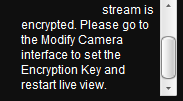
... stream is encrypted. Please go to the Modify Camera interface to set the Encryption Key and restart live view.

Resolution

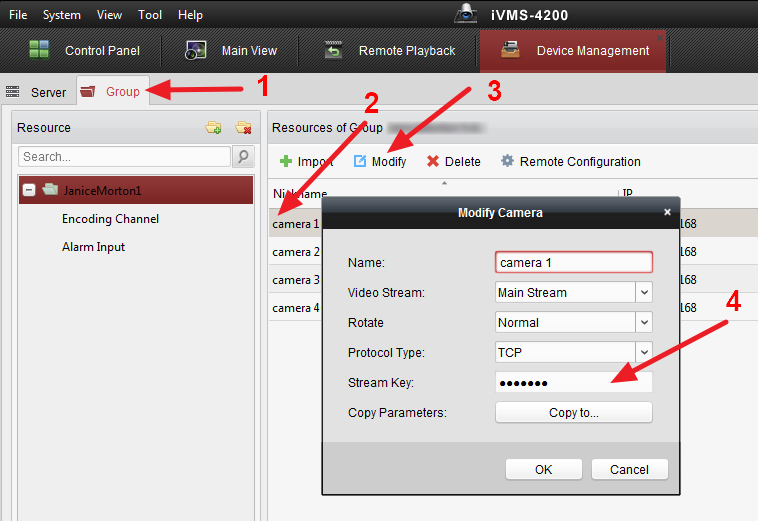
It took me good 15 minutes to find the above mentioned "Modify Camera" interface within IVMS-4200 software... The user manual also didn't have any references to entering the encryption key. Here is the solution:
  • In the main IVMS-4200 control panel click on Device Management.
  • Click on Group tab.
  • Select camera in question and click Modify
  • Enter Stream Key in the Modify Camera pop-up.